

In this post we will learn about Stellar Siege Online Game: Your Ultimate Space Battle Adventure.
Stellar Siege is an immersive, action packed space shooter game designed to test your reflexes, strategic thinking and survival instincts.
Step into the cockpit of a high tech starfighter and defend the galaxy from waves of alien enemies, collect powerful upgrades and achieve the highest possible score.
Perfect for fans of arcade style games, Stellar Siege combines stunning visuals, dynamic gameplay and addictive progression mechanics.

How to Play Stellar Siege: Step by Step Guide
Playing Stellar Siege is easy to learn but challenging to master.
Follow these steps to dominate the galaxy:
1. Open the Game
-
Visit the Stellar Siege webpage.
-
The game runs directly in your browser, no download required.
-
Ensure your browser supports HTML5 and JavaScript for the best experience.
2. Understand the Interface
-
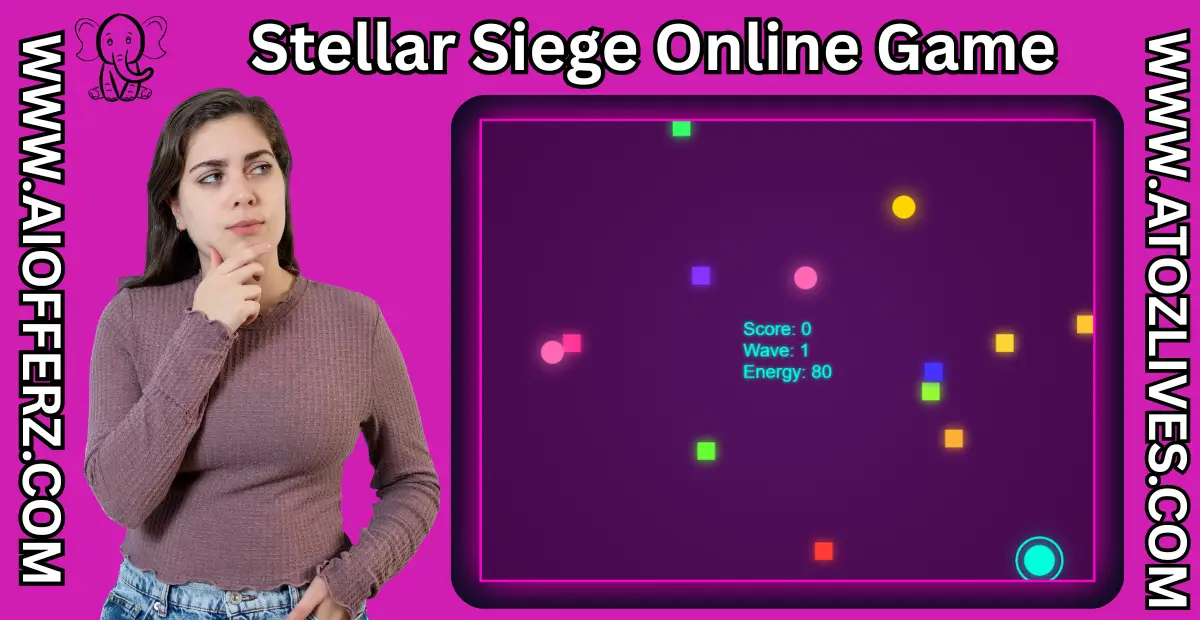
Score: Tracks the points earned by defeating enemies. Displayed at the top left.
-
Wave: Shows your current enemy wave level. Displayed at the top right.
-
Energy: Represents your ship’s health. Displayed at the bottom left.
-
Game Over Screen: Appears when your energy reaches zero. Shows your final score and wave.
3. Move Your Starfighter
-
Mouse Controls: Move your mouse to navigate your ship across the screen.
-
Touch Controls: On mobile devices, drag your finger across the screen to move.
-
Your ship has a shield that prevents minor collisions but avoid enemy contact for maximum survival.
4. Shooting and Combat
-
Automatic Firing: Hold down the mouse button or touch the screen to fire.
-
Bullets: Standard bullets are fired in the direction of your cursor.
-
Upgrades: Collect power ups to enhance your firepower:
-
Spread Shot: Shoots multiple bullets simultaneously.
-
Laser Mode: Fires a powerful laser that lasts for a limited time.
-
Drones: Deploys AI controlled drones that shoot automatically.
-
In this post we are learning about Stellar Siege Online Game: Your Ultimate Space Battle Adventure.
5. Defeating Enemies
-
Enemies appear from screen edges and have different types:
-
Standard Enemies: Basic, easy to destroy ships.
-
Homing Enemies: Track your position for added challenge.
-
Exploders: Explode upon destruction, firing bullets in all directions.
-
Spinners: Constantly change size and move in circular patterns.
-
Teleporters: Can randomly teleport, making them harder to hit.
-
-
Destroying enemies increases your score. Clear waves to advance to tougher challenges.
6. Collect Power Ups
-
Power ups appear randomly on the battlefield.
-
Types include:
-
Energy: Restores your ship energy.
-
Drone Upgrade: Adds extra shooting drones.
-
Spread Upgrade: Increases your bullet spread for multiple shots.
-
Laser Upgrade: Activates temporary laser mode.
-
-
Approach power ups to automatically collect them.
7. Surviving Waves
-
Enemy waves become increasingly difficult with each level.
-
Balance offense and defense to survive as long as possible.
-
Keep an eye on energy levels and pick up energy power ups strategically.
8. Game Over and Restart
-
The game ends when your energy drops to zero.
-
The Game Over screen shows:
-
Final Score
-
Final Wave Reached
-
-
Click or tap the screen to restart and try again.
Key Features of Stellar Siege
-
Browser Based Gameplay: Play instantly without any installation.
-
Responsive Design: Works seamlessly on both desktop and mobile devices.
-
Dynamic Enemies: Each wave introduces new challenges and enemy types.
-
Power Ups & Upgrades: Enhance your ship to maximize destruction.
-
Stunning Visuals: Neon, radial gradient backgrounds and glowing effects create a futuristic space experience.
-
Addictive Progression: Score high, survive waves and compete with yourself.
Tips for Winning
-
Keep moving to avoid enemy collisions.
-
Prioritize collecting energy power ups when low.
-
Use spread and laser upgrades strategically to clear multiple enemies.
-
Deploy drones early to get extra automated firepower.
-
Observe enemy patterns to anticipate attacks.
Technical Requirements
-
Any modern browser (Chrome, Firefox, Edge, Safari) with JavaScript enabled.
-
Works best on screens 800×600 or higher but is responsive for mobile devices.
-
Touchscreen support allows for mobile gameplay without a keyboard.
In this post we are learning about Stellar Siege Online Game: Your Ultimate Space Battle Adventure.
FAQs
1. What is Stellar Siege?
Stellar Siege is a free online space shooter game where you pilot a starfighter, defeat waves of enemies, collect upgrades and aim for the highest score. It runs directly in your browser without any downloads.
2. How do I play Stellar Siege?
Move your ship using the mouse or touchscreen, hold to shoot enemies, collect power ups, and survive waves. Monitor your energy and use upgrades like drones, spread shots and lasers to improve your chances.
3. Is Stellar Siege free to play?
Yes Stellar Siege is completely free to play online. No installation or subscription is required.
4. Which devices support Stellar Siege?
The game works on desktop, laptop, tablets and mobile devices with modern browsers like Chrome, Firefox, Edge and Safari. Touchscreen support is included for mobile gameplay.
5. What are the controls in Stellar Siege?
-
Desktop: Move the mouse to navigate; click and hold to shoot.
-
Mobile/Tablet: Drag your finger to move; touch and hold to shoot.
6. What are the different types of enemies?
Stellar Siege features multiple enemy types:
-
Standard enemies
-
Homing enemies
-
Exploders
-
Spinners
-
Teleporters
Each type has unique behavior, making gameplay more challenging.
7. How do power ups work?
Power ups appear randomly on the battlefield.
Types include:
-
Energy: Restores your ship energy.
-
Drone: Adds shooting drones.
-
Spread: Increases bullet spread.
-
Laser: Activates a temporary laser weapon.
8. How can I survive longer in Stellar Siege?
-
Keep moving to avoid collisions.
-
Collect energy power ups strategically.
-
Use spread and laser upgrades effectively.
-
Deploy drones early for extra firepower.
9. Can I play Stellar Siege on mobile?
Yes Stellar Siege is fully responsive and works on mobile devices with touchscreen controls for movement and shooting.
10. What happens when the game ends?
The game ends when your energy reaches zero. The Game Over screen displays your final score and wave. Click or tap the screen to restart and try again.
In this post we have learnt about Stellar Siege Online Game: Your Ultimate Space Battle Adventure.
“Live Chat Jobs – You have to try this one”
Ready to Begin?
➜ Click Here to explore top-rated affiliate programs on ClickBank!
➜ Reach Our Free Offers: “Come Here To Earn Money By Your Mobile Easily in 2025.”
Want To Read More Then Click Here…
If You Are Interested In Health And Fitness Articles Then Click Here.
If You Are Interested In Indian Share Market Articles Then Click Here.
Thanks To Visit Our Website-We Will Wait For You Come Again Soon…